
Did you know that 75% of online shoppers consider product photos the most influential factor when deciding whether to hit the "buy" button? In 2026, your smartphone is a powerful tool, but raw snaps often fall short of professional marketplace standards. Finding the best photo editing apps for product photography is no longer optional if you want to compete. Whether you're struggling with dull, yellow lighting or messy backgrounds that take hours to clear, the right software makes all the difference.
It's a common struggle for online sellers. You want a consistent brand look across hundreds of listings, but achieving colour-accurate results often feels like a full-time job whilst you're trying to manage inventory. We've tested the latest tools to help you discover the top-rated editing software and workflows to transform your smartphone snaps into professional listings that drive sales. This guide previews the most efficient ways to get crisp images and perfect white backgrounds using a repeatable, fast process. You'll soon be spending less time editing and more time growing your business.
Key Takeaways
- Understand the direct link between image clarity and sales growth whilst learning how to lower your return rates through accurate visuals.
- Identify the best photo editing apps for product photography to achieve professional colour grading and precise manual adjustments directly on your smartphone.
- Evaluate desktop software options like Adobe Photoshop and Affinity Photo for advanced tasks such as "ghost mannequin" effects and complex retouching.
- Leverage cutting-edge AI tools to fix "yellow" indoor lighting and generate realistic product scenes without the need for an expensive photography studio.
- Implement a streamlined editing workflow specifically tailored for marketplace vendors to ensure consistent branding across all your listings.
Why High-Quality Product Photography is Non-Negotiable in 2026
In 2026, your digital shopfront is often the only interaction a customer has with your brand before purchasing. High-quality imagery is the foundation of this relationship. Recent data indicates that 75% of online shoppers rank product photos as the most influential factor in their purchasing decisions. Investing in the best photo editing apps for product photography is the most cost-effective way to bridge the gap between a basic snap and a professional listing. For UK SMEs, the correlation between image clarity and conversion is direct. Listings that provide multiple, clear perspectives can see conversion rates increase by up to 40% compared to those with a single image. It's a simple equation: better photos lead to more sales.
Professional visuals do more than just attract clicks; they protect your bottom line by reducing return rates. Around 22% of product returns occur because the item looks different in person than it did on screen. Applying professional Image editing techniques helps you represent your stock accurately. By using the best photo editing apps for product photography, you can correct lighting and colour shifts that occur during shooting. This ensures customer expectations are managed from the start, leading to fewer disputes and better reviews across the marketplace.
Marketplace standards have evolved significantly. A clean, distraction-free background is now the baseline requirement for any serious seller. This isn't just about aesthetics. In 2026, visual search technology has become a primary way for shoppers to discover new items. Search engines and marketplace algorithms prioritise images with clear subjects and minimal clutter. Edited photos that follow these standards improve your SEO, making your products easier to find amongst thousands of competitors.
The Psychology of the "Add to Basket" Moment
Colour accuracy is vital for preventing "item not as described" disputes. Discerning buyers look for precision. Showing the specific texture and fine detail in categories like furniture builds brand authority instantly. When a customer can see the grain of the wood or the quality of the upholstery, they feel more confident in the price point. Consistent image styling across your entire range creates a professional presentation that encourages repeat business and trust.
Marketplace Requirements vs. Creative Freedom
Standardising your main listing image for a crisp "white wall" look is essential for marketplace compliance. However, you still have room for creative freedom. Use lifestyle shots as secondary images to show product scale and context. This helps the buyer visualise the item in their own home whilst maintaining the clarity of the main shot. Balancing file size is also a priority. You need high resolution for zooming, but images must be optimised to ensure fast loading times on mobile devices, which now account for over 72% of global e-commerce traffic.
Top Mobile Editing Apps for On-the-Go Sellers
Mobile devices account for over 72% of global e-commerce traffic in 2026. This means your images must look sharp and professional on small screens. Finding the best photo editing apps for product photography is the fastest way to improve your shop's appearance without buying an expensive DSLR. Snapseed remains a top choice for those who need precision. Its manual adjustments allow you to control every aspect of the frame, from structure to white balance. It's a reliable, free tool that helps you fix common lighting issues in seconds.
Lightroom Mobile is the industry standard for colour grading. Using presets ensures that your entire inventory has a consistent look, which builds immediate trust with buyers. For sellers who need to clear messy warehouse backgrounds, Photoroom is the leader for speed. It uses advanced AI in product photography to isolate your items and place them in professional studio settings. If you're selling lifestyle-oriented items like home and garden supplies, VSCO offers filters that enhance natural light whilst keeping the product looking realistic.
Ready to showcase your new listings to a wider audience? You can sell online easily by joining our community of independent vendors today.
The Best Free Options for Start-up Vendors
Snapseed’s "Selective" tool is a standout for targeted lighting correction. You can place a control point on a specific dark spot of your product and adjust the brightness of just that area. This prevents you from overexposing the rest of the image. Canva Mobile is another essential for adding subtle watermarks or promotional badges to your secondary images. Whilst native phone editors are improving, they're usually only enough for basic crops and simple rotations.
Premium Apps Worth the Investment
Professional sellers often upgrade to Lightroom for its seamless cloud sync. You can snap a photo on your phone, apply a preset, and the changes appear on your desktop instantly. This is vital for maintaining a consistent brand look across hundreds of listings. Photoroom Pro is a powerful investment for high-volume sellers because of its batch removal tool. It can process 50+ items at once, saving you hours of manual work. Pixelcut is also gaining ground with AI-driven shadows that look realistic rather than obviously "photoshopped".
Desktop Software for Advanced Product Polishing
While mobile apps are excellent for quick adjustments on the go, high-volume marketplace sellers often require more power. Desktop software provides the precision needed for high-end listings that build buyer trust through absolute clarity. Adobe Photoshop remains the gold standard for complex retouching and "ghost mannequin" effects. This technique involves removing a mannequin in post-production to show the inside of a garment, creating a premium look. If you're a budget-conscious UK SME, Affinity Photo is a powerful, subscription-free alternative that matches many of Photoshop's professional features.
Finding the best photo editing apps for product photography often involves choosing between AI automation and manual control. Luminar Neo is a great example of this balance. It uses AI to enhance lighting specifically in electronics photography, where glare and screen reflections are common problems. For those selling high-end jewellery or glossy items, Capture One is the preferred choice due to its superior raw file handling and colour management. It allows for the minute adjustments that high-end buyers expect.
Batch Processing: Saving Hours on Large Inventories
Efficiency is vital when you have hundreds of items to list. You can create "Actions" in Photoshop to automate repetitive tasks like resizing and watermarking. This allows you to process an entire folder of images with one click. Similarly, using Lightroom's "Sync" feature lets you apply the same exposure and white balance to a whole shoot instantly. Proper file organisation is essential before you upload your stock to the Anglia Market platform. It keeps your workflow fast and ensures your shopfront looks uniform and professional.
Professional Retouching Techniques
Advanced polishing involves fixing details that customers will notice under scrutiny. Removing dust, scratches, and fingerprints from shiny product surfaces is essential for a "brand new" look. You should also correct lens distortion. Wide-angle smartphone lenses often make products look wider or taller than they actually are. Use desktop tools to straighten lines and restore the true proportions of your items. Finally, use advanced colour matching to ensure the colour on the screen matches the physical item. This is the most effective way to prevent the "item not as described" disputes that lead to costly returns.
Harnessing AI: Backgrounds, Lighting, and Models
Artificial intelligence has transformed the way online sellers approach their shopfronts. AI background generators now allow you to create professional scenes without the high cost of a physical studio. You can place an item in a luxury living room or a sun-drenched garden with a few clicks. AI lighting correction also solves the common problem of "yellow" indoor shots. These tools analyse the frame to restore natural colour balance instantly. This technology is so effective that AI-assisted product photography can reduce per-image production costs by approximately 89% compared to traditional studio methods.
Virtual models are another massive shift for 2026. Apparel sellers can now display clothing on realistic digital figures, skipping the logistical nightmare of organising photoshoots. However, you must be wary of the "uncanny valley" risk. If an AI-generated model or background looks slightly "off", it can make your products look untrustworthy. Choosing the best photo editing apps for product photography that prioritise realism over flashy effects is vital. Buyers in 2026 are savvy; they value authenticity above all else.
Ready to put these tools to work and reach more customers? Sign up as one of our marketplace vendors and start uploading your professional listings today.
Top AI Tools for Ecommerce in 2026
Claid.ai is essential for standardising user-generated content. It takes rough customer photos and polishes them to match your professional marketplace display. AdCreative.ai helps you generate high-converting social media posts directly from your existing product shots. For those selling kitchen and dining items, Flair.ai offers a brilliant drag-and-drop scene construction tool. It allows you to build a lifestyle setting around your product that looks grounded and high-end.
Ethical and Practical AI Use
Maintaining realism is your number one priority. You should never AI-generate the product itself. Doing so leads to "item not as described" disputes and damages your reputation. Use AI to enhance the environment, not the stock. Building transparency is also key. Many successful sellers now disclose when AI has been used for backgrounds to build trust with their customer base. To keep things looking natural, always combine AI backgrounds with real shadows. This ensures your product looks like it truly belongs in the scene rather than just being "stuck" on top.
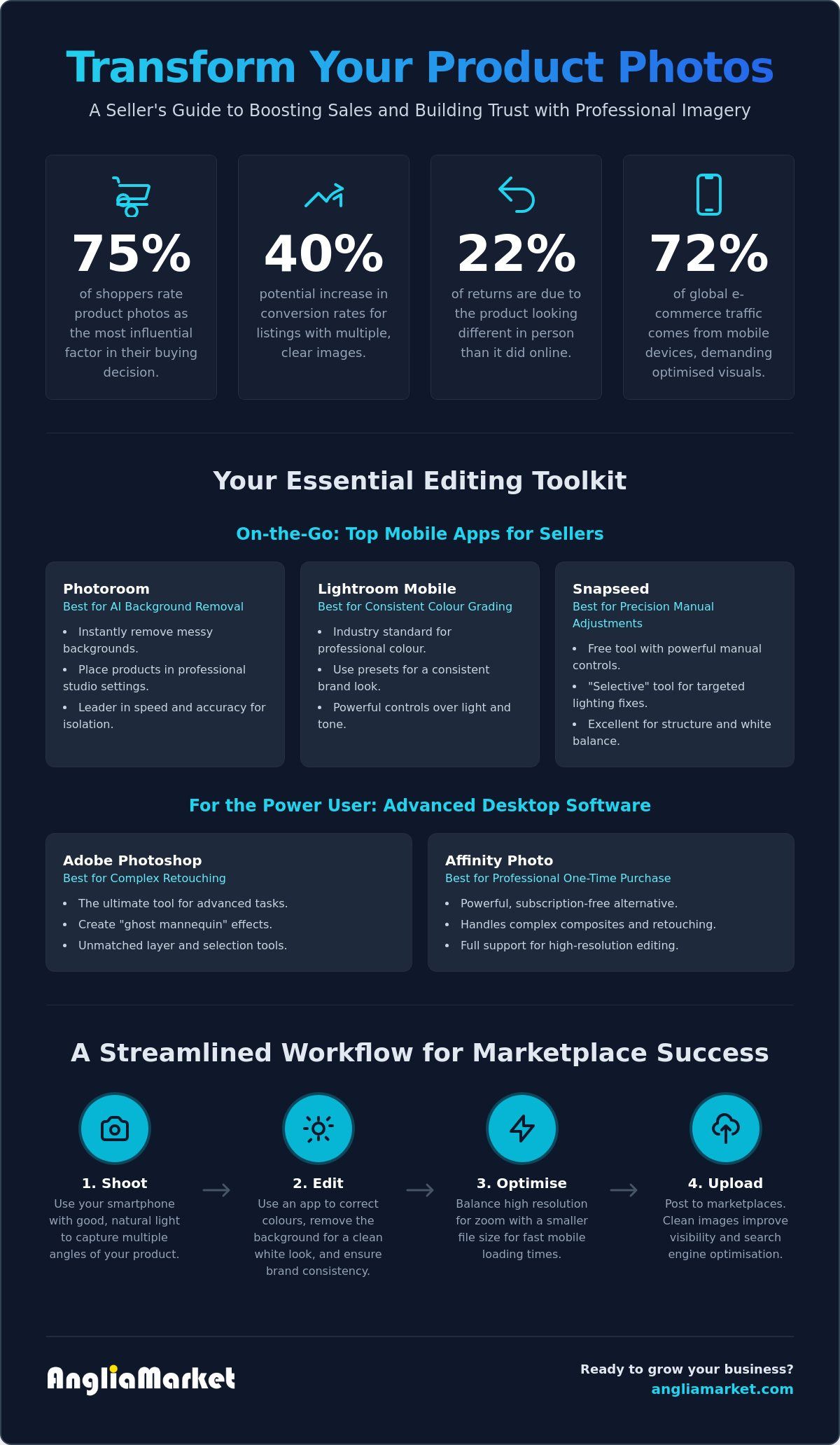
A Professional Workflow for Anglia Market Vendors
Establishing a repeatable workflow is the secret to managing a large inventory without burning out. For independent UK sellers, efficiency is just as important as image quality. By following a structured four-step process, you can ensure every listing meets professional standards whilst keeping your editing time to a minimum. It starts with the capture. Always use the "Pro" or "Manual" mode on your smartphone camera. This allows you to shoot in RAW format, which preserves more data for editing later. It gives you the flexibility to fix highlights and shadows that would otherwise be lost in a standard JPEG.
Once you've captured your shots, it's time for basic corrections. Open your images in the best photo editing apps for product photography, such as Lightroom or Snapseed. Focus on exposure, contrast, and white balance first. You want your product to look as close to the physical item as possible to reduce the risk of returns. If you're shooting indoors, you'll likely need to "warm up" or "cool down" the image to remove yellow or blue tints caused by household bulbs. Consistency is key here; applying the same preset to every photo in a collection will give your shopfront a unified, professional feel.
The third step is preparing your primary image. Most marketplaces require a clean, white background for the main listing photo. Use a tool like Photoroom to strip away the background instantly. To prevent the product from looking like it's "floating", always add a subtle drop shadow. This grounded look makes the item feel tangible and real. Finally, pay attention to your export settings. With mobile commerce accounting for 72.9% of global e-commerce traffic in 2026, your images must load fast. Export your files as optimised JPEGs or WebP files, ensuring they are high-resolution enough for zooming but small enough to prevent lag.
Optimising for the UK Customer
British shoppers appreciate authenticity and local context. When creating lifestyle shots, use settings that resonate with British home and garden aesthetics. Avoid overly clinical, American-style stock backgrounds. Ensure all text overlays use British English spelling. Using "colour" instead of "color" or "organise" instead of "organize" builds immediate trust. You can also highlight your "UK Seller" status through subtle visual cues, such as a small flag icon or branding that emphasises your local roots.
Ready to Sell? Final Checklist
Before you go live, run through this final quality control list to ensure your listings are perfect:
- Check your images on both a mobile screen and a desktop monitor to ensure colours look consistent.
- Ensure your most competitive items are featured in the Anglia Market Sale section for maximum visibility.
- Verify that the product fills at least 80% of the frame in your primary shot.
- Confirm that the texture and fine details are visible when using the zoom tool.
High-quality visuals are the most effective way to sell online successfully. By using the best photo editing apps for product photography and following this workflow, you'll build a trustworthy brand that stands out amongst the competition.
Scale Your Sales with Professional Visuals
Visual excellence is the most direct path to building buyer trust in 2026. By using the best photo editing apps for product photography, you can transform basic smartphone shots into high-converting assets that lower your return rates and boost your professional authority. Whether you're leveraging AI for background removal or using desktop software for precise colour grading, these tools make professional results accessible for every independent vendor.
Consistency across your listings shows customers that you're a reliable seller. Now that you have the right workflow, it's time to put these images to work. Our platform is already trusted by thousands of UK small businesses and offers an easy-to-use environment for categories like electronics, home, and garden. You'll join a supportive community of independent vendors who are growing their brands every day.
Start selling your products on Anglia Market today and watch your visual investment pay off. We're excited to see your business thrive.
Frequently Asked Questions
What is the best free app for product photography for beginners?
Snapseed is the most recommended free option for those just starting out. It provides a comprehensive range of professional tools without any hidden subscription costs. The interface is designed for simplicity, allowing you to make precise adjustments to brightness and contrast through easy swiping gestures, which is ideal for cleaning up quick smartphone shots.
Do I need a professional camera, or is a smartphone enough in 2026?
A modern smartphone is perfectly adequate for creating high-quality marketplace listings. By 2026, mobile sensor technology has advanced to a point where the difference between a phone and a DSLR is negligible for web-based viewing. Most independent vendors find that the speed of shooting and editing on a single device far outweighs the benefits of a traditional camera setup.
How do I remove the background from my product photos for free?
You can achieve a clean look using the free versions of apps like Photoroom or Adobe Express. These platforms use intelligent edge detection to isolate your product from its surroundings instantly. To get the best results without paying for premium features, try to shoot your item against a plain, contrasting wall to help the software identify the subject more accurately.
What are the best image dimensions for selling on Anglia Market?
The ideal size for your listings is 2000 x 2000 pixels with a square aspect ratio. This specific resolution ensures that your images remain sharp when customers use the magnifying zoom tool to inspect details. Using a square format also helps maintain an organised and professional appearance across your entire shopfront on both mobile and desktop views.
Can I use AI to generate my product photos from scratch?
Generating the actual product from scratch with AI is risky and often leads to customer dissatisfaction. Whilst AI is excellent for creating realistic lifestyle backgrounds, the product itself must be a genuine photograph to ensure the buyer receives exactly what they saw online. Authenticity is a major factor in building long-term trust with your customer base.
How do I ensure the colours in my photos match the real product?
Achieving colour accuracy relies on setting the correct white balance before you start shooting. You can use a neutral grey card as a reference point to help your software calibrate the colours correctly during the editing stage. This is an essential step when using the best photo editing apps for product photography to prevent artificial lighting from altering the true appearance of your stock.
What is the best app for batch editing 100+ product photos?
Lightroom Classic remains the top choice for handling large volumes of inventory efficiently. Its synchronisation feature allows you to apply lighting and colour corrections to hundreds of photos at once. For those who prefer a mobile-first approach, the batch processing tools in Photoroom Pro can automate background removal for dozens of items in a single session.
Is it better to use a white background or a lifestyle background?
The most effective strategy is to use both. A plain white background is the industry standard for your primary listing image as it removes all distractions for the buyer. Secondary images should use lifestyle settings to show the product in use, which helps the customer understand the scale and context of the item within a real-world environment.

Here to help — ask anything
If you have any questions regarding this disclaimer or any of our policies, please contact Anglia Market through the contact page on our website, by email using the address provided on the site, or by phone on 0333 772 2593