

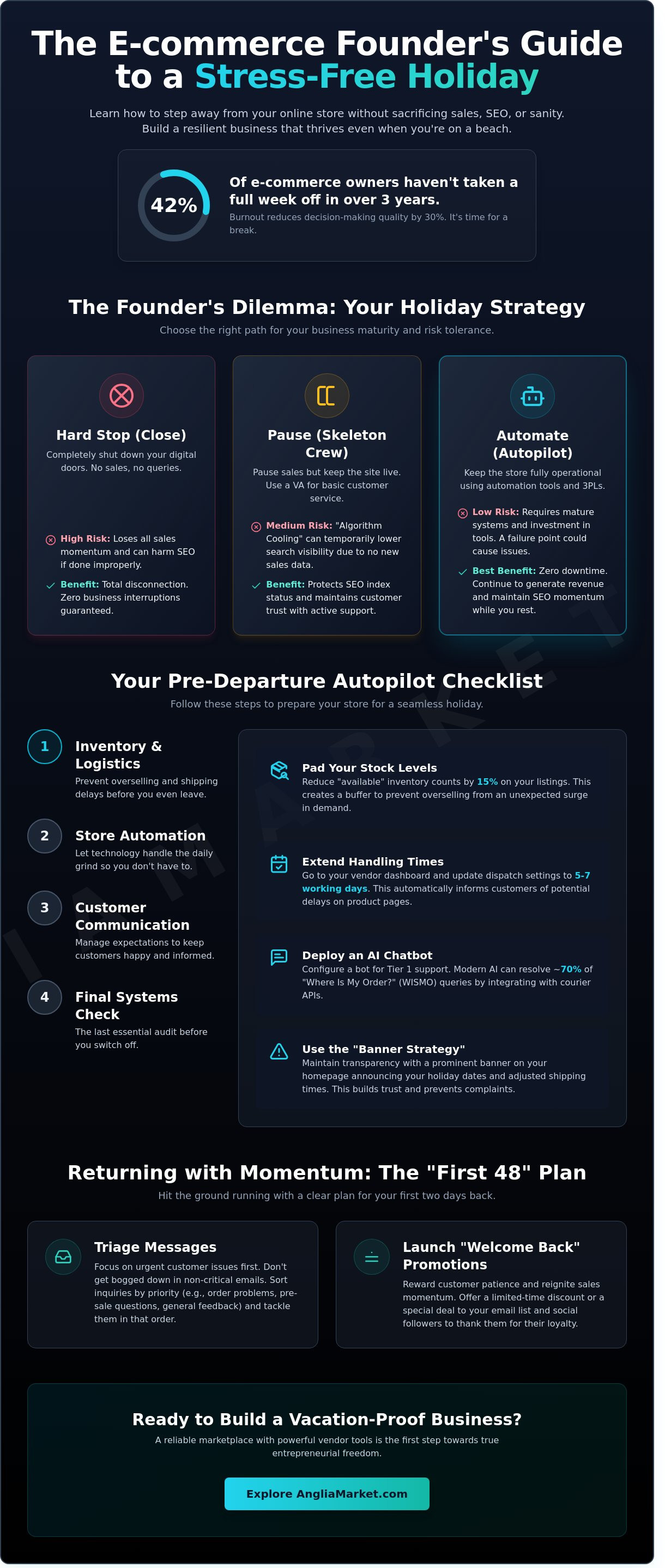
What if your business actually grew while you were relaxing on a beach in Cornwall instead of hunched over your laptop? For many UK entrepreneurs, stepping away feels like a massive risk. A 2024 study by Brightpearl revealed that 42% of e-commerce owners haven't taken a full week off in over three years. You probably worry that "Vacation Mode" will destroy your search rankings or lead to a flood of customer complaints. Learning how to take a holiday when you run an online store is about more than just rest. It's about building a resilient, automated system that protects your hard work and your reputation.
We understand the guilt of not being "always on" and the anxiety of shipping delays. You've built a trustworthy brand. You want to keep that momentum. This guide shows you how to take a well-deserved break without losing sales or damaging your SEO. You'll discover how to return to a healthy bank balance and total mental clarity. We'll preview the best 2026 automation tools and logistics strategies to keep your store running perfectly while you're away from the keyboard.
Key Takeaways
- Learn to choose between pausing or automating your shop to protect your search visibility and business momentum.
- Discover how to take a holiday when you run an online store by setting up automated handling times and padding your stock levels.
- Use the "Banner Strategy" to maintain transparency with UK customers, ensuring they feel valued even while you are away.
- Follow an essential 4-step checklist to audit your security and settle all £-value invoices before you head off.
- Implement a "First 48" re-entry plan to triage messages and launch promotions that reward customer patience with new deals.
The Founder's Dilemma: To Close, To Pause, or To Automate?
By 2026, the UK e-commerce sector has become a relentless 24/7 engine where founders often feel chained to their dashboards. Recent data from the Federation of Small Businesses (FSB) suggests that 48% of solo entrepreneurs haven't taken a full week of leave in over two years. The psychological barrier is high. You fear that a single day away will tank your rankings or lead to a flood of negative reviews. However, the hidden cost of this "always on" culture is business stagnation. Burnout reduces decision-making quality by 30% after just six months of continuous high-stress work.
To better understand this concept, watch this helpful video:
Choosing your strategy depends on your current volume and infrastructure. You have three primary paths. The Hard Stop involves closing your digital doors entirely, which is a rare choice in 2026 due to the loss of momentum. The Skeleton Crew relies on a part-time virtual assistant or a trusted freelancer to handle basic queries and emergencies. Finally, the Automated Store uses AI-driven tools and third-party logistics (3PL) to keep orders moving while you're away. Learning how to take a holiday when you run an online store requires picking the model that fits your risk tolerance and current revenue.
The Reality of 'Vacation Mode' on SEO
Many sellers fear that pausing a store permanently destroys their Google or marketplace rankings. This is a myth. Modern platforms like Anglia Market and Shopify offer settings that maintain your index status even while sales are paused. Amazon's "Vacation Settings" hide your FBM (Fulfilled by Merchant) listings but keep your FBA products active. Algorithm Cooling is the temporary drop in search visibility that occurs when a lack of fresh sales data causes marketplace bots to deprioritise your listings. You can prevent this by keeping some low-maintenance listings active or running a small ad spend during your break.
Assessing Your Business Maturity
Your store's readiness for a break depends on its systems. If your daily workflow includes more than five manual tasks, such as hand-writing labels or manual inventory syncing, you have critical failure points. Reliable marketplace platforms ease this stress by centralising these functions. A mature business can survive a 10-day break because it uses automated email responders and pre-scheduled social media updates. Check your analytics; if 80% of your orders are processed without your direct intervention, you're ready to disconnect.
Preparation & Automation: Setting Your Store to Autopilot
Learning how to take a holiday when you run an online store starts with removing yourself from the daily grind. Automation is your best employee while you're away. In late 2025, industry data showed that 64% of UK retailers who automated their order workflows saw no dip in customer satisfaction during peak holiday periods. The goal is to create a self-sustaining loop that handles the basics without your manual input.
Start by padding your stock levels. If your inventory tracking isn't 100% real-time, reduce your "available" counts by 15% across all listings. This buffer prevents overselling if a sudden surge occurs while you're mid-flight. You should also implement the Early Bird shipping strategy. Clear every single pending order 48 hours before your departure. This 48-hour window allows you to handle any last-minute courier issues or address queries before you lose reliable internet access.
- Extended Handling Times: Adjust your settings to 5-7 working days. This automatically updates delivery estimates on product pages, so customers know what to expect.
- AI Chatbots: Deploy a bot to handle Tier 1 queries. Modern AI can resolve approximately 70% of "where is my order" (WISMO) questions by pulling tracking data directly from your courier API.
Technical Tweaks for a Stress-Free Break
The first step is visiting your vendor dashboard to update your dispatch settings. Don't just rely on a banner at the top of your site; change the actual lead times in your shipping profiles. Set up automated inventory alerts to trigger a notification to a backup contact if stock hits zero. Finally, configure your CRM or helpdesk with "Out of Office" workflows that provide links to your FAQ page and expected response dates.
The Power of Marketplace Support
Selling on established platforms like Anglia Market provides a vital safety net for independent founders. These marketplaces handle the heavy lifting of payment security and site uptime, meaning you don't have to worry about server crashes while you're on a beach. If you use a third-party logistics (3PL) provider, your holiday is even easier. A 3PL continues to pick, pack, and ship your goods, whereas a merchant-fulfilled model requires a trusted staff member or a complete shop pause.
The Buffer Benefit of marketplace-managed transactions ensures that payment processing and basic order confirmations happen instantly; this keeps your account health metrics stable even while you're offline. If you're looking to scale your reach before your next break, you can start selling with us to access these built-in support structures.
The Communication Toolkit: Managing Customer Expectations
Transparency is a core brand value that prevents customer friction. UK shoppers appreciate honesty; in fact, 78% of consumers report higher loyalty to brands that provide clear delivery timelines during peak or holiday periods. Learning how to take a holiday when you run an online store requires a shift from "always on" to "always honest." Instead of worrying about lost sales, focus on preventing the 15% refund rate typically caused by shipping delays that weren't communicated upfront.
The "Banner Strategy" is your first line of defence. Place a high-contrast notification at the very top of every page. This banner should stay fixed as the user scrolls. Use direct language like "Next shipping date: 14th August" to manage expectations before they even reach the checkout. For social media, avoid the "closed" sign. Post a "behind the scenes" shot of your prep for the holiday. Frame the break as a way to source new stock or refresh the shop. This builds anticipation for your return on a specific date, such as a "Monday Morning Restock" event.
Dealing with urgent queries requires firm boundaries. Most "emergencies" in retail aren't life-threatening. Set an auto-responder that directs people to your help resources. If a customer is truly unhappy about a delay, offering a small discount code for their next purchase often resolves the issue instantly. It's a small price to pay for your peace of mind.
Copy-Paste Templates for Your Holiday
Use these scripts to keep your messaging consistent across all platforms while you're away.
- Template 1: Shipping Banner – "Notice: We're taking a short break. Orders placed now will ship on [Date]. Use code HOLIDAY5 for 5% off while you wait."
- Template 2: Auto-Responder – "Thanks for reaching out! We're currently away from the warehouse to recharge. We'll get back to you personally on [Date]. For quick answers, check our help centre below."
- Template 3: Post-Purchase Email – "Order Confirmed! Just a reminder that we are currently on a scheduled break. Your items will be dispatched with priority on [Date]. We'll send a tracking link then!"
Maintaining Trust While You're Away
Your support page serves as a 24/7 digital assistant. A well-structured FAQ section can deflect 80% of routine holiday emails by answering questions about sizing, returns, and UK VAT. This is vital when figuring out how to take a holiday when you run an online store without your inbox exploding. Keep your review loops active by setting up automated "Review Request" emails to trigger 14 days after the scheduled shipping date. This ensures you still collect social proof and maintain your search rankings even while you're offline.
The 4-Step Pre-Departure Checklist for 2026
Preparation is the difference between a relaxing break and a working holiday. In 2026, automation handles much of the heavy lifting, but manual checks remain vital. Learning how to take a holiday when you run an online store requires a systematic approach to your exit. Use this checklist to ensure your business remains stable while you're offline.
Step 1 & 2: Financials and Security
Cash flow must remain fluid while you're away. Settle all pending invoices with UK wholesalers at least 72 hours before your flight. You don't want a missed £500 payment to freeze your supply chain mid-trip. Clear financials ensure your vendors stay happy and your stock keeps moving.
- Subscription Audit: Verify that renewals for your e-commerce platform and marketing tools are active. A failed payment on a critical inventory plugin can break your checkout process.
- Access Control: Assign "Limited Access" permissions to any temporary staff or virtual assistants. Only provide the specific tools they need to manage orders or customer queries.
- Security Freeze: Perform a "Security Freeze" by updating your 2FA settings and notifying your business bank of your travel dates to avoid automated fraud blocks on international transactions.
It's vital to complete a security audit before leaving the country. This includes checking that all two-factor authentication (2FA) methods are linked to a device you'll actually have with you. Don't leave your primary authentication phone in a desk drawer in London while you're in Spain.
Step 3 & 4: Logistics and Emergencies
Logistics can make or break your reputation. Coordinate with UK couriers like Royal Mail, DPD, or Evri to set up "Hold" or "Redirect" services for incoming returns. This prevents a pile-up of parcels at an unattended office or warehouse. Sync with your suppliers to pause incoming stock shipments. If your 2026 growth strategy involves high turnover, ensure your warehouse has 14 days of buffer stock to avoid "Out of Stock" notices. Understanding how to take a holiday when you run an online store means planning for these quiet periods in your supply chain.
- The Red Folder: Keep a digital "Red Folder" containing emergency contacts, insurance policy numbers, and recovery codes. Make this accessible to one trusted person who can act in your absence.
- The 15-Minute Rule: Set a strict "Check-in Window" once a day. Spend exactly 15 minutes reviewing high-level metrics to prevent "Scroll Fatigue" and keep your mind on the holiday.
Define what constitutes a real crisis. A single bad review isn't an emergency. A site-wide checkout failure is. If you need help managing your shop settings before you go, visit our Seller Support Centre for technical assistance.
Re-entry Strategy: Returning to Your Store with Momentum
Returning from a break shouldn't feel like a punishment for taking time off. The "First 48" plan is your roadmap for the first two days back. It focuses on high-impact tasks while keeping stress levels low. Learning how to take a holiday when you run an online store is only half the battle; the return determines your long-term success. If you've been away for 7 days, expect a backlog of approximately 15% to 20% more queries than a standard week. Don't try to clear them all in one hour.
Start by launching a "Welcome Back" promotion. This creates immediate cash flow and rewards customers who visited while you were away. A simple 10% discount code or a "Free Gift with Orders over £50" offer works well. It shifts the focus from your absence to a new, exciting opportunity for the buyer. It's a commercial move that builds momentum fast.
The Triage Method for Post-Holiday Work
Efficiency is key during your first 48 hours. Sort your inbox by "Action Required" versus "FYI" immediately. Delete the newsletters and focus on customer enquiries first. A 2025 UK retail study showed that 62% of customers expect a response within 24 hours of a business reopening. Prioritise shipping for the oldest orders first. This satisfies the most patient buyers and prevents negative reviews. Use your loyalty program to send a "Thank You" bonus of 50 points to anyone who shopped during your break. This small gesture turns a delayed delivery into a positive brand experience.
Scaling Toward True Freedom
Once the backlog is clear, analyse your holiday data. If manual order processing took 5 hours on your first day back, that's a task that should have been automated in early 2025. Look for bottlenecks. If your logistics struggled, consider the benefits of selling online through a marketplace that handles fulfilment for you. This reduces your operational overhead significantly.
Plan your next break immediately, but consider "Micro-breaks" instead of long fortnights. Taking 3 or 4 days off every quarter is often better for e-commerce health than one long annual leave. It keeps the business agile and prevents massive order backlogs from piling up. Mastering how to take a holiday when you run an online store means building a system where the store thrives, whether you're at your desk in London or on a beach in Spain.
- Review Performance: Check conversion rates during your absence to see if your "Away" messaging worked.
- Update Inventory: Ensure stock levels are accurate after the post-holiday shipping surge.
- Refine Automation: Set up new auto-responders based on the most common questions you received while away.
Secure Your Freedom and Business Growth
Running a successful UK venture doesn't mean you're tied to a desk 365 days a year. By implementing the 4-step pre-departure checklist and leveraging automation, you can maintain your sales momentum while enjoying well-earned time off. Clear communication with your customers prevents a backlog of support queries, while a structured re-entry strategy ensures you hit the ground running when you return. Mastering how to take a holiday when you run an online store is simply about building systems that work for you, not the other way around.
Success in 2026 relies on choosing the right platform to host your products. You need a partner that simplifies the technical side of retail so you can focus on the big picture. Anglia Market provides a supportive marketplace for UK small businesses, offering secure vendor management tools and direct access to thousands of active UK buyers looking for quality products. When your store is backed by reliable infrastructure, stepping away becomes a stress-free reality rather than a founder's dream.
Ready to scale your business so it runs without you? Start selling with Anglia Market today. You've built something great; now it's time to enjoy the flexibility you deserve.
Frequently Asked Questions
Will putting my online store on 'Vacation Mode' hurt my Google rankings?
Putting your online store on 'Vacation Mode' can negatively impact your Google rankings if it results in product pages being hidden or returning 404 errors. Search engines crawl your site 24/7, and removing content often leads to a loss of indexed pages. Instead of a full shutdown, keep your listings active. This ensures you don't lose the SEO progress you've made while learning how to take a holiday when you run an online store.
How do I handle shipping delays when I'm on holiday without getting bad reviews?
You can avoid bad reviews by updating your shipping settings and product descriptions to reflect longer lead times. According to a 2024 BrightLocal survey, 76 percent of consumers read reviews regularly, so transparency is vital. Place a clear banner at the top of your site. Send an automated order confirmation email that reiterates the specific date shipping will resume to manage expectations immediately.
Should I hire a virtual assistant just for the week I am away?
Hiring a virtual assistant for a single week is usually inefficient because the training process often takes 10 to 15 hours. It's better to outsource tasks at least 3 weeks before your departure. This gives the assistant time to learn your systems. If you only need coverage for 7 days, consider using an automated helpdesk tool like Gorgias or Zendesk to handle basic enquiries instead.
Is it better to close my shop completely or just extend the delivery times?
It's better to extend your delivery times rather than closing your shop completely. Closing your store stops all cash flow, whereas extending lead times allows you to continue generating revenue. Data from the UK Office for National Statistics shows that retail sales fluctuate monthly, so keeping your "open" sign up helps maintain momentum. Just ensure your "Estimated Delivery Date" is accurate to prevent customer frustration.
How do I stop myself from checking my sales and emails while on the beach?
You can stop checking sales by deleting your e-commerce and email apps from your phone for the duration of your trip. Set a strict "no-screens" window for at least 6 hours of your day. If you must check, schedule a single 20-minute block at 9:00 AM. This discipline is a core part of how to take a holiday when you run an online store without burning out.
What should I do if a customer opens a dispute while I am out of the country?
If a customer opens a dispute, you should address it within the platform's required timeframe, which is often 48 hours on sites like eBay or Etsy. Prepare a folder of "Evidence Templates" including proof of postage and your holiday policy before you leave. If you can't access a computer, designate a trusted contact in the UK to monitor your account for urgent legal or financial notifications.
Can I still run social media ads for my store while I'm on holiday?
You can still run social media ads, but you should shift your focus to brand awareness or "coming soon" promotions. Running "Buy Now" ads with 14 day shipping delays can lead to a high bounce rate. Reduce your daily ad spend by 50 percent to maintain a presence without overspending on frustrated clicks. Ensure your ad copy explicitly mentions the shipping dates to maintain trust.
How do I tell my regular customers that I am taking a break?
Tell your regular customers about your break through a dedicated email newsletter sent 7 days before you depart. Include a "Last Orders" deadline to create a sense of urgency. Mention your return date clearly. You can also offer a small discount code, such as 10 percent off, for customers who are happy to wait for their items to ship upon your return.

Here to help — ask anything
For questions about this disclaimer or the site, contact us via the website’s Contact page.


