
It is 9:00 PM on a Tuesday, and you have just received a notification for a sale on your website, only to realise you sold that very same item on a different marketplace three hours ago. You now have to send a frustrating apology email and cancel the order, all whilst worrying about how this affects your seller rating and account standing. If you are tired of the constant stress that comes with manual updates, learning how to manage inventory across multiple platforms is the only way to protect your business reputation. Most UK SMEs still rely on spreadsheets to track their stock, but this approach often leads to errors and missed opportunities as your brand grows.
We understand that you want a reliable way to keep your sales channels in sync without spending every evening buried in data entry. You deserve a system that works as hard as you do. This guide will show you how to organise your stock, prevent overselling, and synchronise your sales across every marketplace you use. We will explore how to move from manual tracking to a streamlined, automated system that gives you more time to focus on sourcing new products and marketing your business to loyal customers.
Key Takeaways
- Prevent overselling and protect your seller rating by synchronising stock levels in real-time across every sales channel.
- Create a "single source of truth" for your business using standardised SKUs to ensure product data remains consistent.
- Discover how to manage inventory across multiple platforms by transitioning from manual spreadsheets to efficient, automated tools.
- Establish an accurate data foundation by performing a full physical stocktake before linking your primary sales channels.
- Scale your reach whilst maintaining control by choosing UK-focused marketplaces that support independent small businesses.
What is Multichannel Inventory Management and Why Does It Matter?
Multichannel inventory management is the process of synchronising your stock levels across every sales point you use. Whether you sell on your own website, social media, or a marketplace, your records must reflect reality in real-time. Discovering how to manage inventory across multiple platforms is the first step toward scaling a retail business without losing control. Understanding What is Multichannel Inventory Management is vital for any growing brand. It prevents the "Overselling Trap", where a product sells on one site but remains listed as "in stock" on another.
Poor stock control ruins your seller reputation. Most major marketplaces track your order cancellation rate closely. High rates lead to penalties, including lower search rankings or account suspension. There is also a significant financial impact. If you overstock to play it safe, you tie up capital that could be used for marketing. If you understock, you lose sales. Learning how to manage inventory across multiple platforms ensures you find the perfect balance between available cash and available stock.
The Core Components of a Multichannel System
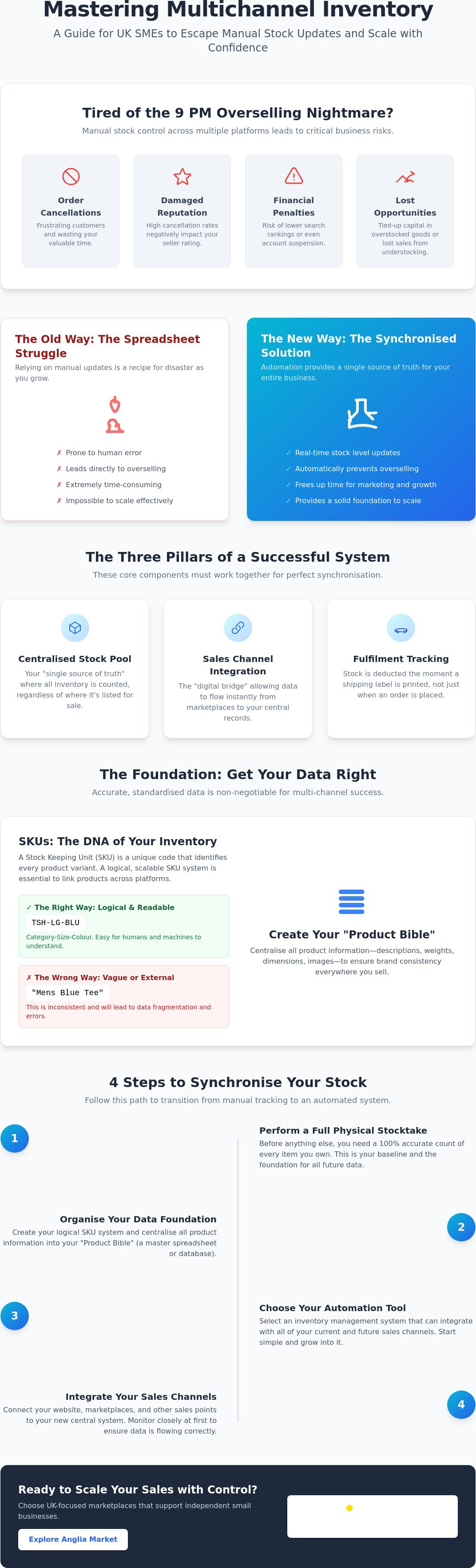
A successful system relies on three main pillars. First is the centralised stock pool. This acts as your "single source of truth", where all inventory is counted regardless of where it's listed. Second is sales channel integration. This is the digital bridge that allows data to flow instantly from the marketplace to your records. Finally, fulfilment tracking ensures that stock is deducted the moment you print a shipping label. Without these three parts working together, your data will always be slightly out of sync.
Common Challenges for UK Small Businesses
UK retailers face specific hurdles that make manual tracking difficult. You must manage different VAT requirements depending on where you sell and what you ship. Handling returns is another headache. If a customer returns a faulty item, it shouldn't go back into your active stock pool automatically. You also need to account for lead times from suppliers. If your supplier takes two weeks to deliver, your inventory system must reflect that incoming stock without making it available for sale too early. Using a platform like Anglia Market can simplify this process by providing a transparent environment for your listings.
The Foundation: SKU Standardisation and Data Centralisation
A Stock Keeping Unit (SKU) is the DNA of your inventory management. It is a unique alphanumeric code that identifies every product variant you sell. If you want to master how to manage inventory across multiple platforms, you must start here. Using different names for the same item across various marketplaces leads to data fragmentation. For instance, if you list a "Navy Cotton Tee" on one site and a "Men’s Blue T-Shirt" on another without a shared SKU, your system cannot link them. This confusion results in manual errors and inaccurate stock counts that eventually lead to overselling.
How to Create a Scalable SKU System
A good SKU should be readable by humans but designed for machines. Use a logical structure like CAT-SIZE-COL (e.g., TSH-LG-BLU). This allows you to identify a product at a glance. Avoid using manufacturer barcodes as your primary SKU. Barcodes are for scanning at checkout; SKUs are for internal logic. If you change suppliers but keep the same product, a custom SKU allows you to maintain your sales history without disruption. Clear naming conventions ensure that your future employees can understand the system as your business scales.
Centralising Your Product Information
You need a "Product Bible". This is a master reference containing descriptions, weights, dimensions, and high-quality imagery. Storing this in one place ensures your brand looks professional whether a customer finds you on a niche marketplace or a major platform. For those starting out, a master spreadsheet is a common first step. However, learning how to manage inventory across multiple platforms as you grow often involves moving this data into a dedicated database. Practical Steps to Synchronise Your Stock Levels require this central reference point to become your primary source of truth for every listing you create.
Your physical workspace should mirror your digital inventory structure. Labelling shelves with your SKUs makes picking and packing faster and reduces errors. When your digital "Product Bible" matches your physical warehouse layout, you eliminate the guesswork that slows down growth. This level of organisation is essential for any independent vendor looking to sell online with confidence. It transforms your storage area from a cluttered room into a streamlined fulfilment centre where every item has a specific, trackable home.
Manual vs. Automated Management: Choosing Your Strategy
Choosing the right path depends on your current sales volume and growth plans. For many micro-businesses, manual management feels like the only cost-effective option. However, as you scale, the time spent on data entry becomes a significant liability. Every hour you spend updating a sheet is an hour you aren't spending on marketing or product development. Understanding how to manage inventory across multiple platforms requires an honest look at your daily workflow. If you spend more than 30 minutes a day on stock updates, you have likely reached the tipping point where manual tracking costs you more than it saves.
The Manual Spreadsheet Approach
Excel and Google Sheets are powerful tools for low-volume sellers. They are flexible and involve no monthly software fees. To make this work, you must use formulas to protect your margins. A simple conditional formatting rule can highlight cells in red when stock drops below a specific threshold. Whilst this works for a few orders a week, it remains a temporary fix. Human error is inevitable. One typo can lead to a stockout on your website and an oversell on a marketplace. This method eventually hits a ceiling where the "free" cost is outweighed by the price of lost sales and marketplace penalties.
Automated Software Solutions
Automation removes the human element from the synchronisation process. Modern tools use API integrations to talk directly to your sales channels. When an item sells on one site, the software instantly updates your other listings. This is vital for managing "kits" or "bundles". If you sell a gift set made of three individual items, the software can deduct those separate components from your total stock automatically. When you are selling online with Anglia Market, using a managed strategy ensures your listings stay active and accurate without constant manual intervention.
The ROI of automation is found in the time recovered. Transitioning from a spreadsheet doesn't have to be painful. Start by cleaning your "Product Bible" mentioned in the previous section. Export your data, verify your SKU accuracy, and then import it into your chosen tool. This shift allows you to focus on high-level strategy rather than the repetitive task of how to manage inventory across multiple platforms manually every single night. Investing in the right tools early prevents the administrative bottlenecks that often stifle growing UK SMEs.
Practical Steps to Synchronise Your Stock Levels
Once you have established your SKU system and chosen your management strategy, it is time to implement the synchronisation. Following a structured plan ensures your data remains clean from day one. Learning how to manage inventory across multiple platforms is a technical process that requires attention to detail at every stage. You cannot build a reliable system on guesswork. Use the following steps to get your stock in order.
- Step 1: Perform a full physical stocktake. Count every item in your storage area to ensure your starting numbers are 100% accurate. This is the foundation of your "single source of truth".
- Step 2: Link your primary sales channel. Connect your website or main marketplace to your inventory tool. This becomes your baseline for all other data.
- Step 3: Map your SKUs. Ensure the codes you created in previous sections match exactly across every secondary platform.
- Step 4: Set safety stock levels. This acts as an insurance policy against overselling during busy periods.
- Step 5: Test the synchronisation. Place a test order on one platform and verify that the stock level drops automatically on all others.
Setting Up Safety Stock Buffers
Safety stock is a buffer that prevents you from selling your very last item twice. For your most popular items, you might set a buffer of two or three units. When your stock hits this threshold, the system tells the marketplaces you are out of stock. This is your best defence against overselling. You should adjust these buffers for seasonal peaks like Black Friday or Christmas. Increasing your safety stock during high-traffic events protects your seller rating when sales velocity is at its highest.
Managing Returns and Exchanges
Returns can break your synchronisation if you don't have a clear workflow. Establish a "quarantine" process where returned items are inspected before being added back to the "available" pool. Only once an item is cleared for resale should you update your central system. This ensures all platforms are updated simultaneously. If you are looking to scale your business with a supportive partner, start selling online with a UK-focused marketplace that empowers independent vendors. Mastering how to manage inventory across multiple platforms allows you to handle returns and sales with total confidence.
Scaling Your Sales with Anglia Market
Anglia Market is the perfect addition to your multichannel strategy. We provide a transparent, UK-centric environment for British vendors to reach a domestic audience without the noise of global marketplaces. Our platform is built specifically to support small and medium-sized UK businesses. We offer a reliable sales channel that helps you avoid the international customs complexities often found on larger sites. Listing your products is simple. Managing your storefront is efficient. You can leverage our established customer base to grow your brand whilst keeping your operational overheads low.
Success in retail requires more than just high-quality products. It requires a partner that understands your operational needs. Learning how to manage inventory across multiple platforms is much easier when your sales channels provide clear, accessible data. Anglia Market integrates into your existing workflow by offering a straightforward interface that respects your SKU discipline. This ensures that your "single source of truth" remains accurate whether you are selling one item a day or one hundred. We focus on the transaction so you can focus on your business.
Joining a Community of UK Sellers
We value the spirit of independent commerce. Being part of a marketplace that prioritises local vendors gives you a competitive edge. You can focus on your craft whilst we provide the platform to reach buyers who value British businesses. You aren't just another account on a global server. You are part of a growing community of entrepreneurs. Visit our vendors page to see how other independent sellers are thriving. If you have questions about setting up your shop, the Anglia Market support centre offers comprehensive resources to guide you through the process.
Next Steps for Your Business
Take a moment to review your current inventory process. Identify your biggest bottleneck. If you are still spending hours on manual spreadsheets or worrying about account suspensions due to stock errors, it is time for a change. With the UK VAT registration threshold now at £90,000 for the 2026/2027 tax year, many SMEs have more room to grow before facing additional tax burdens. Use this opportunity to streamline your operations. Move to a platform that prioritises seller success and provides the tools you need to scale. Start selling on Anglia Market today and master how to manage inventory across multiple platforms with a partner that truly understands the UK market.
Take Control of Your Multichannel Growth
Mastering the logistics of multichannel retail is a journey that starts with standardised SKUs and ends with a scalable, automated workflow. By centralising your product data and implementing safety stock buffers, you eliminate the risk of overselling and protect your hard-earned seller rating. Understanding how to manage inventory across multiple platforms isn't just about avoiding errors; it's about reclaiming your time to focus on the creative and commercial aspects of your brand. You've seen how physical stocktakes and the right software can transform your daily operations from a source of stress into a streamlined engine for growth.
Ready to take your business to the next level? We are a supportive UK-based marketplace dedicated to SME growth. Our easy-to-use vendor dashboard allows you to manage your storefront with total clarity, ensuring you can reach local customers without the stress of complex overheads. Join the Anglia Market vendor community and grow your UK business today. Your growth shouldn't be limited by administrative bottlenecks or manual spreadsheets. Take the next step toward a more efficient, profitable future and start selling with confidence.
Frequently Asked Questions
How do I manage inventory for free across multiple platforms?
You can manage inventory for free by using manual spreadsheets like Google Sheets or by utilising the free plan offered by Zoho Inventory for very low order volumes. Whilst these methods cost nothing in software fees, they require a significant investment of your time to update stock levels manually after every sale. These "free" options are best suited for micro-businesses with low turnover who can afford the time for daily data entry.
What is the best inventory management software for small UK businesses?
The best software depends on your specific budget and the number of sales channels you use. Sage Accounting offers a "Start" plan for £18 + VAT per month as of April 2026, which is an excellent entry point for many. For more advanced features, Zoho Inventory and inFlow are popular choices that specialise in how to manage inventory across multiple platforms with real-time synchronisation. These tools help automate the "single source of truth" mentioned earlier in this guide.
Can I use Excel to manage inventory for multiple sales channels?
Yes, you can use Excel to track stock for various online shops, but the process is entirely manual and prone to human error. You must download sales reports from each marketplace daily and update your master spreadsheet to ensure your numbers remain accurate. This method is a viable starting point for new sellers, but it becomes a major liability once you start receiving multiple orders every day across different sites.
How often should I do a physical stocktake?
You must perform a full physical stocktake at least once a year to satisfy HMRC and ensure your year-end accounts are accurate. However, most successful UK retailers perform "cycle counts" monthly or quarterly for their most popular items. Frequent checks allow you to identify discrepancies caused by damage or theft before they lead to embarrassing stockouts on your active listings.
What happens if I oversell a product on a marketplace?
If you oversell a product, you will be forced to cancel the order and issue a full refund to the customer. This triggers a "defect" on your seller account, which can lower your search rankings or lead to account suspension if it happens too often. Marketplaces prioritise the buyer experience, so maintaining high stock accuracy is the only way to protect your long-term reputation and visibility.
Is it better to use one central warehouse or multiple storage locations?
A single central warehouse is usually the best choice for SMEs because it keeps your logistics simple and your data centralised. Managing multiple storage locations adds significant complexity, as you must track stock transfers between sites and regional availability. It's better to master how to manage inventory across multiple platforms from one location before you consider the added costs of regional hubs or secondary units.
How do I handle stock for bundles or gift sets?
You handle bundles by using "kit" or "assembly" features in your inventory software to link a parent SKU to its individual components. When a gift set sells, the system should automatically deduct the correct number of individual items from your total stock. This ensures you don't accidentally sell a standalone item that has already been promised as part of a bundle waiting to be packed.
What is the difference between inventory management and order management?
Inventory management focuses on the stock you currently have sitting on your shelves, whilst order management tracks the journey of a product after a sale is made. Inventory management ensures you have the right amount of stock to meet demand. Order management handles the picking, packing, and shipping process to ensure the customer receives their purchase on time. Both systems must work together to keep your business running smoothly.

Here to help — ask anything
If you have any questions regarding this disclaimer or any of our policies, please contact Anglia Market through the contact page on our website, by email using the address provided on the site, or by phone on 0333 772 2593